


Current version 0.3.0 · Windows 10 and 11
Licensed properly, fully offline.
Every Schedulo app is unlocked with a signed licence key. The Schedulo Licence Manager issues, tracks and withdraws keys from one desktop app, with no server, no accounts and nothing to host.
Schedulo licensing in brief.
Tamper-proof
Every key is digitally signed with Ed25519 and names its product. Edited keys and wound-back clocks are caught.
Fully offline
Nothing is uploaded and there's no licence server. Your apps keep working without the internet.
Always on record
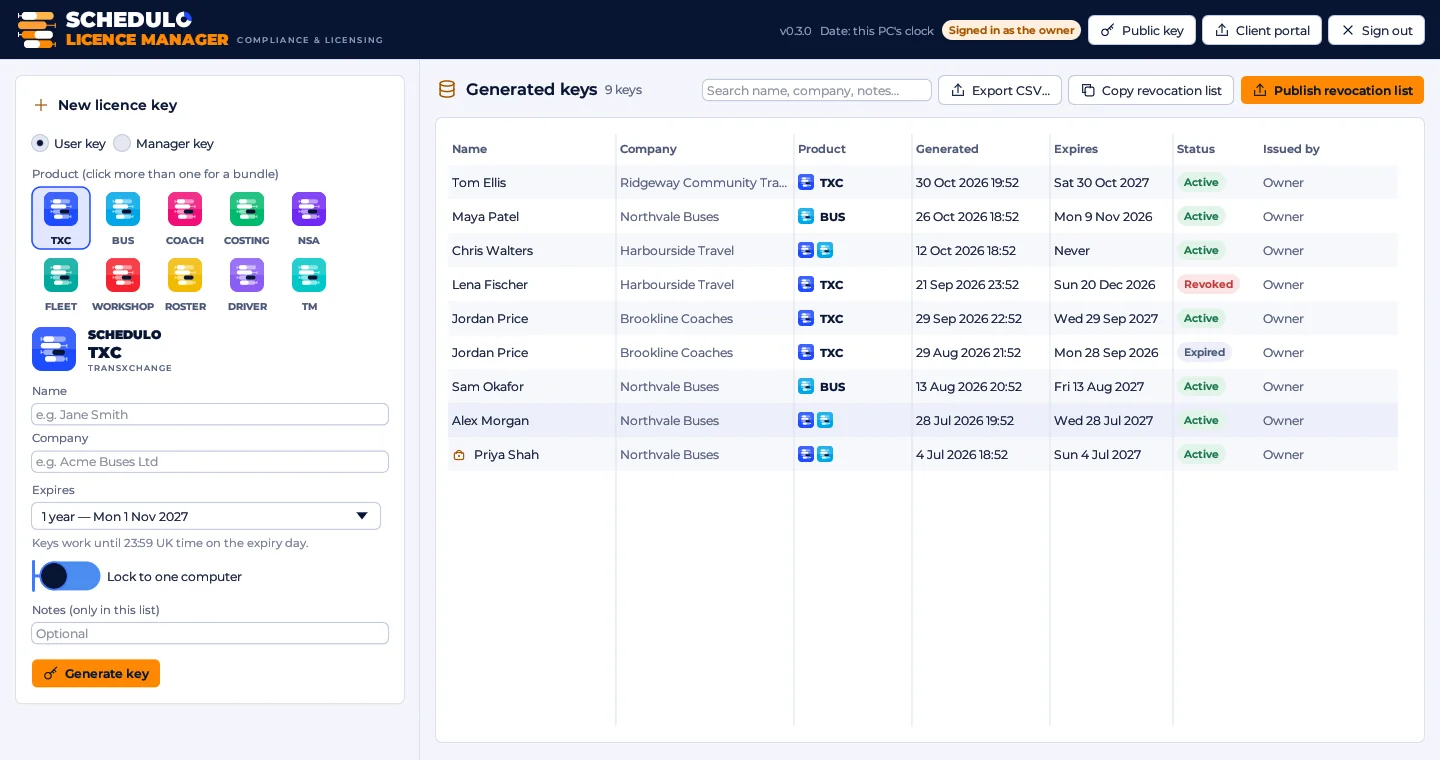
Every key is listed with its product, name, company, dates and status. Search it, export it to CSV, or revoke a key.
How licensing works for you.
You don't install the Licence Manager. You just receive a key for each product you use.
Receive it
Your key appears on the Licence keys page of your client area, and we e-mail you to say it's there. You can also have a licence file to open. Each key names the products it unlocks, so one key can cover several.
Activate
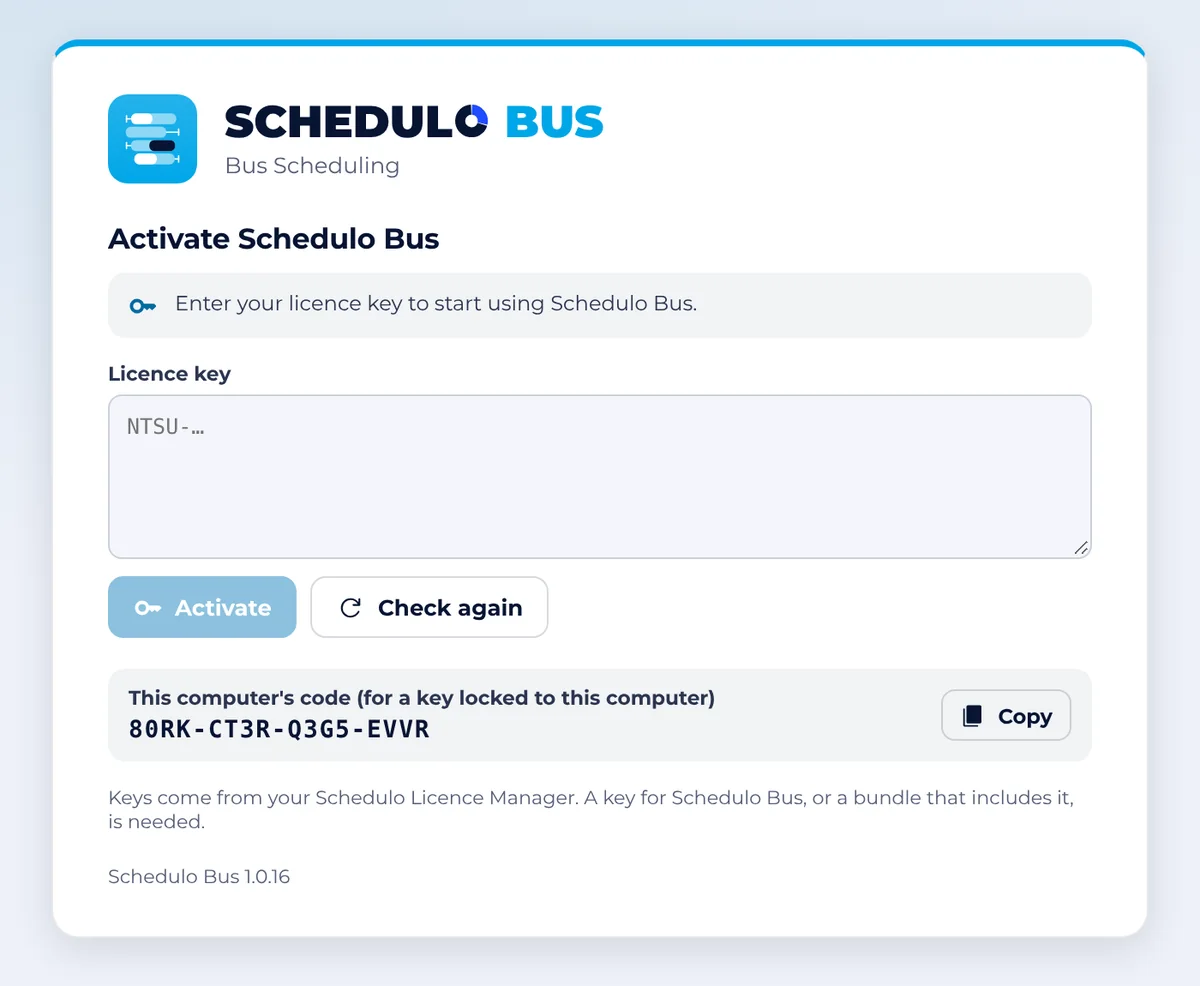
Start the app and paste the key on the activation screen. The status bar shows who the copy is licensed to.
Keep working
Keys run to 23:59 UK time on their expiry day. Renewing is just a new key.
A chain of trust, with nothing to host.
One private root key sits at the top. Every app carries only the public half, so it can check a key but never make one.
- The owner holds the root key file and can make keys for every product.
- Manager keys (
NTSM-) let a trusted person make user keys for chosen products, offline, without the root key. - A manager's keys can only cover the manager's products and can't outlast the manager's own key.
- User keys (
NTSU-) unlock one product or a bundle, and carry the person's name, company, issue date and expiry. - Revoking a manager key revokes every key that manager made.

 Each app holds only the public key: it checks keys but can’t make them.
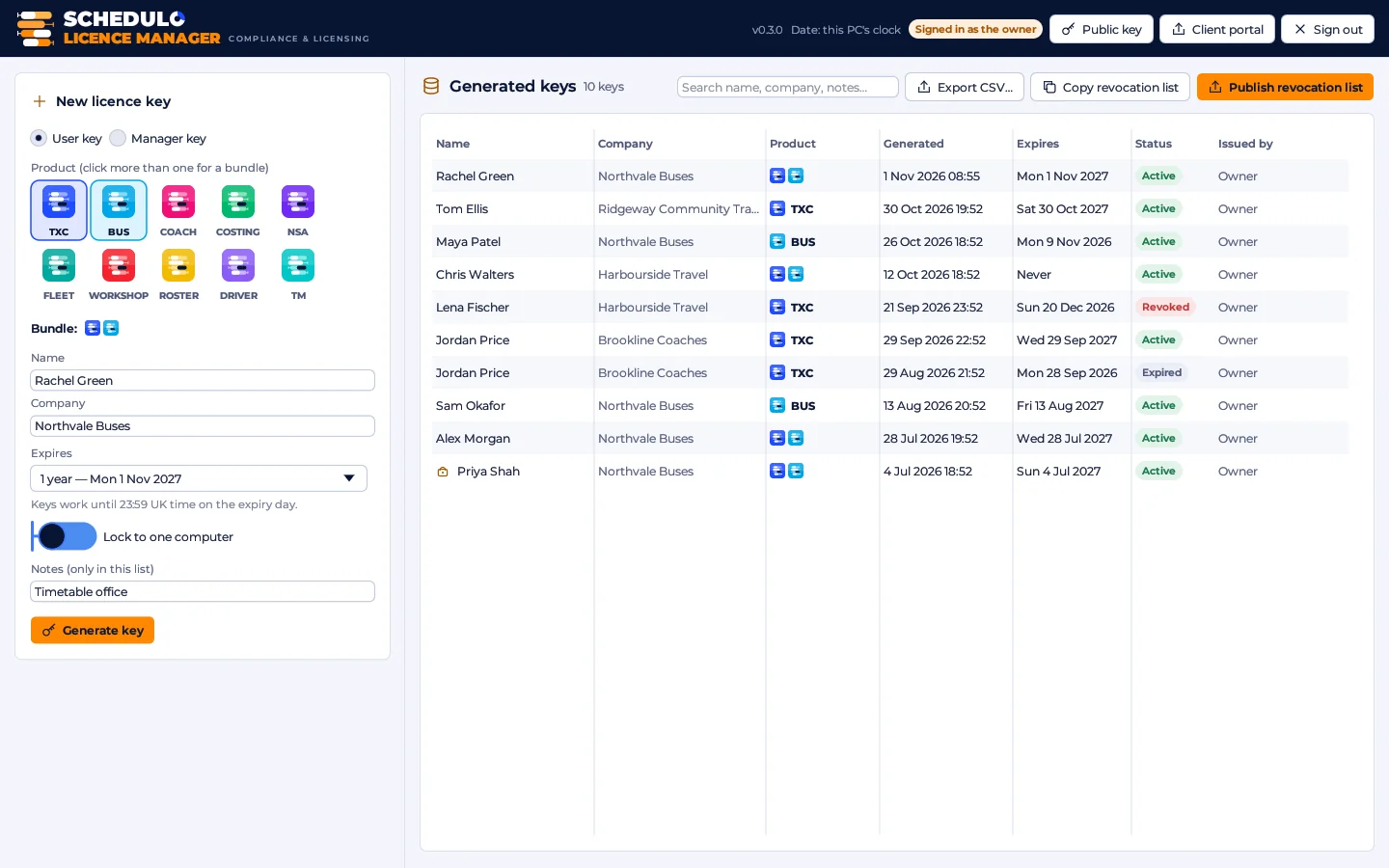
Pick the products, the person and the length.
Making a key starts with the product tiles. Click more than one for a bundle key.
- Ten products in the Schedulo family, each with its own tile and colour.
- Lengths for every arrangement: 7 to 90 days, 6 months, 1 to 10 years, end of month, quarter or financial year, a custom length, or perpetual.
- The real date is shown beside every preset before you choose it.
- Lock to one computer by typing the code shown on that computer's activation screen.
- The new key is shown with the product's logo, ready to copy, save as a licence file, or send to the client's portal.
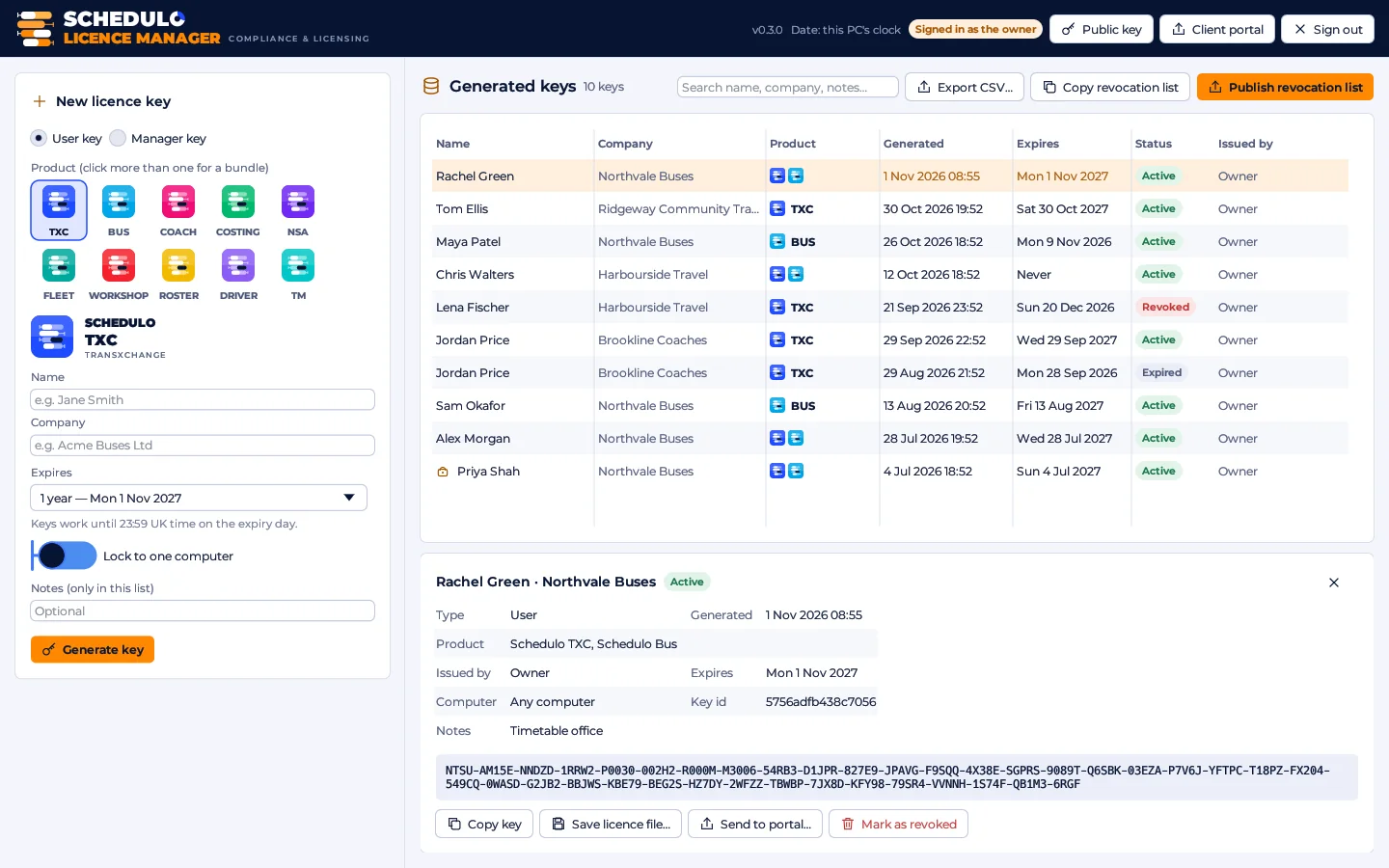
Know who has what, and for how long.
Every key the Licence Manager makes is kept in a list you can search, export and act on.
- Each key's details: product, name, company, the date and time it was made, expiry and status.
- Search and export the list as CSV.
- Send to portal: a new key goes straight to the client's Licence keys page in the client area, with an e-mail, and their key request is marked done.
- Revoke a key and publish the signed list of revoked keys online in one click; the client area is told too.
- Every app picks up the list when it can, adds to its built-in one, and never blocks start-up while it checks.
Build your key, then ask for it.
Pick the products and how long the key should run. The card shows what the key will cover, and the button writes the e-mail to Licence@schedulo.uk for you.
- One key can cover several products.
- Keys run to 23:59 UK time on their last day.
- Locking to one PC is optional.
Flexible keys for every kind of organisation.
Keys name their products
The products are sealed in the signature: a key for Schedulo Bus never unlocks Schedulo TXC, and one key can cover several products.
Smart expiry
7, 14, 30 or 90 days, 6 months, 1 to 10 years, end of month, quarter, financial year (31 March), a custom date, or perpetual.
Lock to one PC
Optionally tie a key to a single computer using that computer's code, shown in the app.
Manager keys
Let trusted managers in your organisation issue keys for chosen products only.
A clock you can trust
When online, the date comes from the internet. Offline, the PC clock is used with protection against winding it back.
Revocation
A key can be withdrawn. Revoked keys are published in a signed list that the apps check, without ever blocking start-up.
Ready for the whole Schedulo family.
The same licence system covers every Schedulo product, today's and those still to come.
TXCTransXChangeAvailableBUSBus schedulingAvailable LICENCE MANAGERCompliance & licensingAvailable
 COACHCoach schedulingAvailable
 COSTINGOperational costingPlanned
 NSANext stop announcementsPlanned
 FLEETVehicle & asset managementPlanned
 WORKSHOPMaintenance & workshopPlanned
 ROSTERCrew rosteringIn progress
 DRIVERDriver managementPlanned
 TMTransport managementPlanned
In practice
What you need to use a Schedulo licence.
The practical marks
- No licence server to run
- Checked fully offline
- One key can cover several products
- Dated keys, or perpetual
- Optional lock to one PC
- Revoked keys are checked online, never blocking start-up
New features for the Licence Manager.
We're planning the next set of features for the Licence Manager now. The details are coming soon, so check back here or get in touch to tell us what you'd like to see.
New features for the Licence Manager, announced here.
Paste the key. That's it.
Every Schedulo app opens on its activation screen until a valid key is entered. Spaces, line breaks and capital letters don't matter, and a licence file can be opened instead.
- The screen shows this computer's code, for keys locked to one PC.
- The status bar then shows who the copy is licensed to.
- Questions about a key? Licence@schedulo.uk
Ready to plan smarter?
Ask for a demonstration, a trial or a licence key, or tell us what your operation needs. Every message goes to the right person at Newey Transport Services, and we reply by e-mail.
- Demonstrations and general questions
- ContactUs@schedulo.uk
- Licence keys and renewals
- Licence@schedulo.uk
- Help with Schedulo TXC, Bus, Coach or licensing
- Support@schedulo.uk
- News and updates
- Follow Schedulo on LinkedIn