


Current version 0.5.13 · Windows 10 and 11
Bus timetables, registered right first time.
Schedulo TXC is TransXChange software for UK bus operators. Open, build, check and publish your timetables in TransXChange 2.4 and 2.5, then see how they run with live punctuality from the Bus Open Data Service.
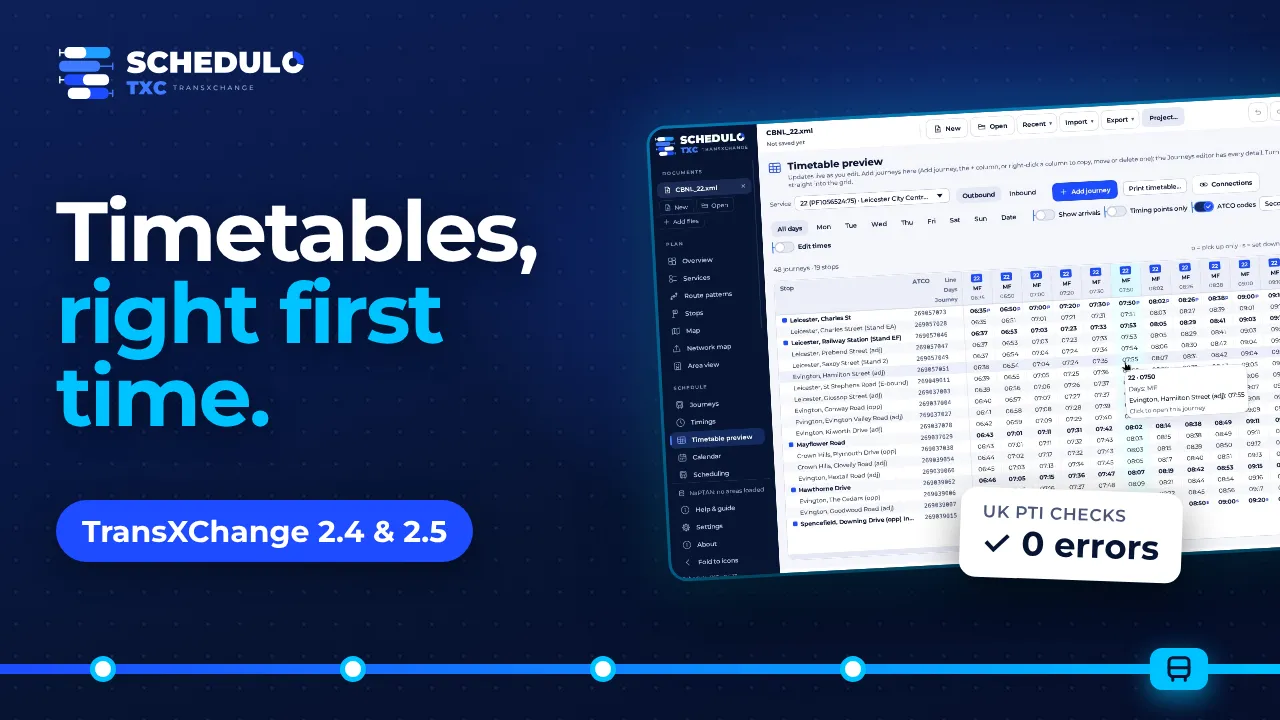
Schedulo TXC in brief.
Schedulo TXC in about a minute.
Open a TransXChange file, check it in plain English and publish it to BODS.
64 seconds. The video plays from YouTube (privacy-enhanced mode). Nothing is loaded from YouTube until you press play.
Edit, publish, then see how it runs.
Edit with confidence
Services, route patterns, journeys and days of operation, with bulk edits, full undo and a change history.
Publish right first time
Built-in schema validation, the UK PTI rules BODS checks, and an export that changes nothing you didn't.
See how it runs
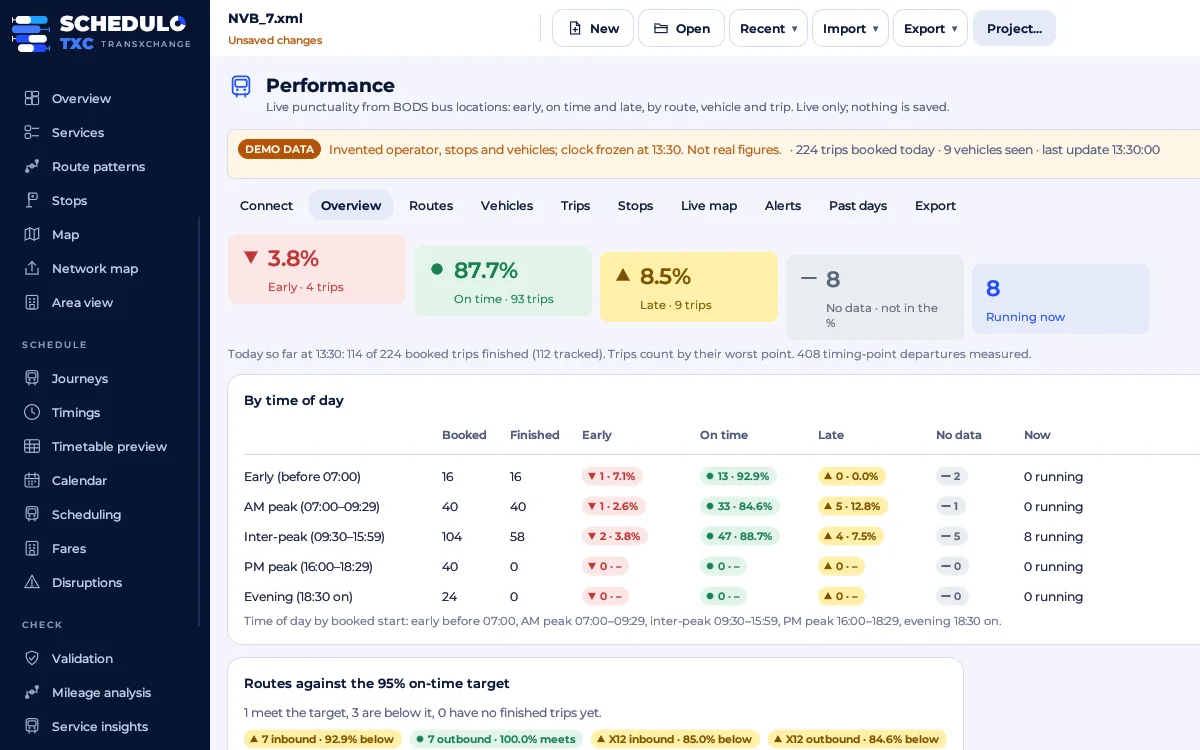
Live punctuality from BODS by route, vehicle, trip and stop, against the timetable you registered.
Everything a bus planner needs, in one place.
Built for service planners, registration staff and operators. Use the Windows app or the browser version, which is one file you open with a double-click.
Exact TransXChange 2.4 & 2.5
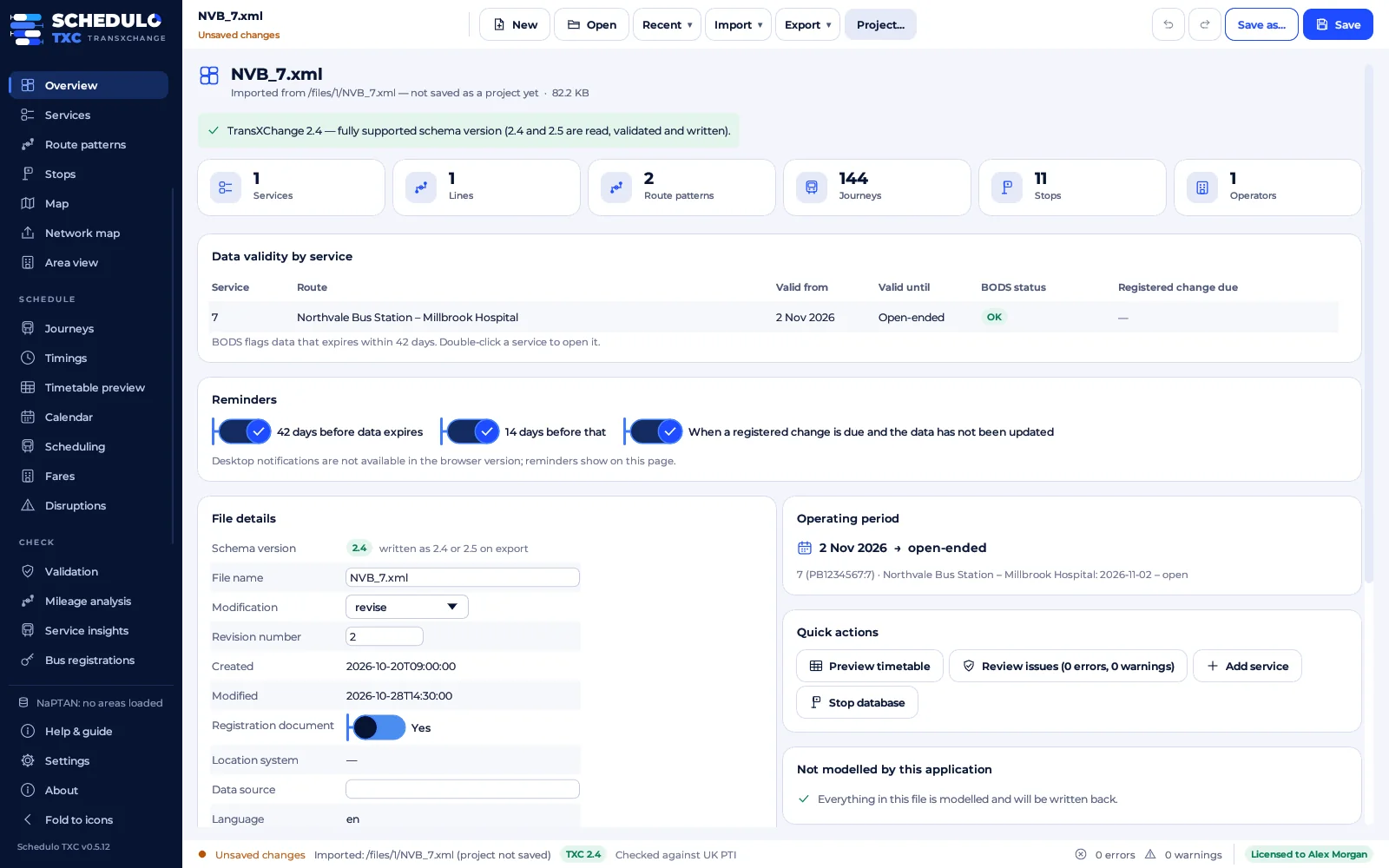
Open, create and combine files. Several files become one project, and the export keeps everything you didn't change. A fidelity check proves it.
Ready for BODS
XSD validation, UK PTI and operational checks, each explained in plain English. Publish to BODS checks each file as it will be uploaded, so BODS accepts it first time.
Live performance
Early, on time and late by route, vehicle, trip and stop, with a live map and alerts, from the Bus Open Data Service (with your free BODS API key) or bustimes.org.
Maps and network maps
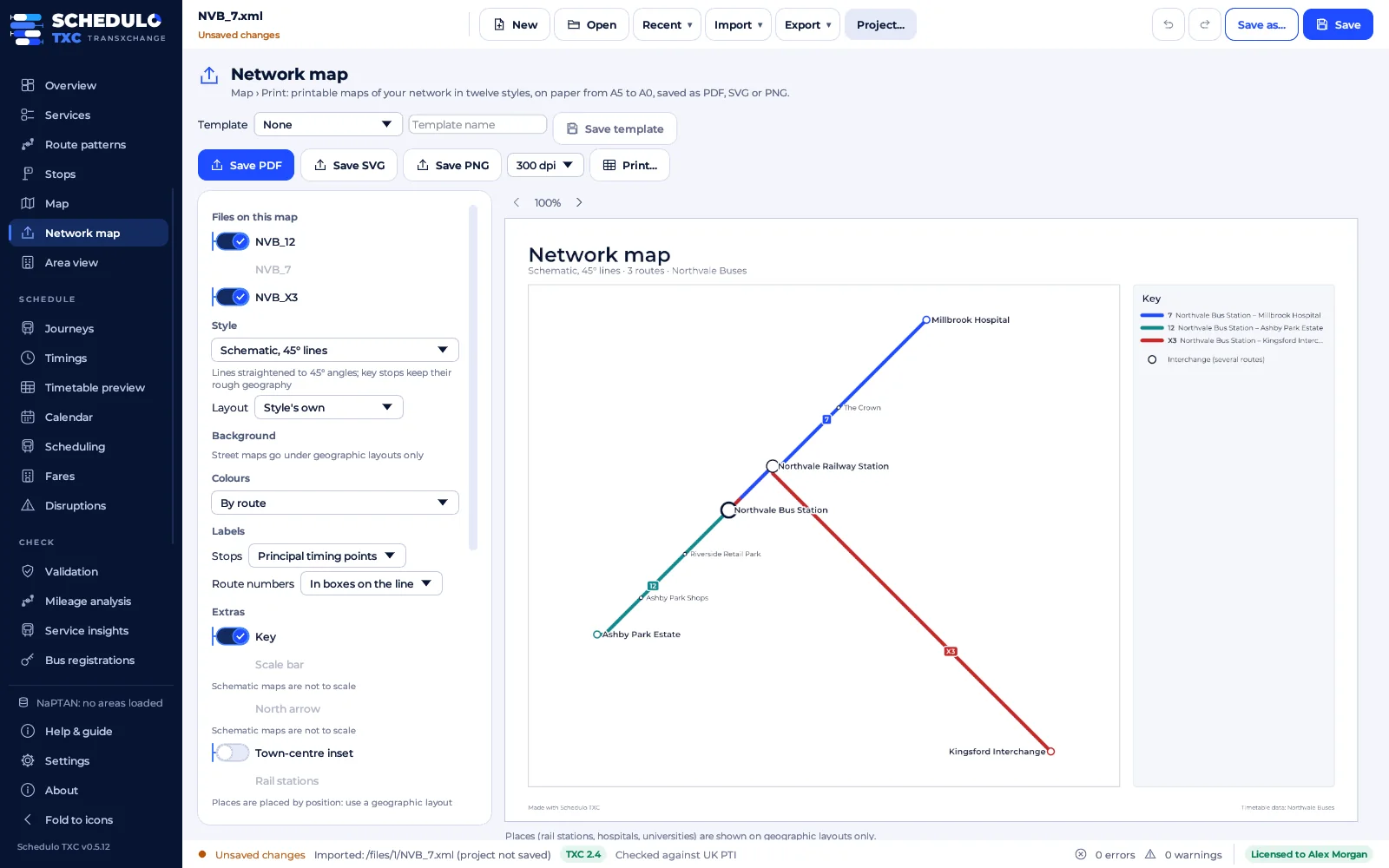
Routes on OpenStreetMap with snap to roads, NaPTAN and rail replacement stops, and printable network maps in 12 styles.
Print in 22 styles
Timetables, timetable books, bus-stop posters and notices, in Welsh and English, with accessible large-print layouts.
Planning tools
Christmas and bank holiday wizard, school term dates, spreadsheet import, GTFS import and export, connections checker and scheduling overview.
Fares and disruptions
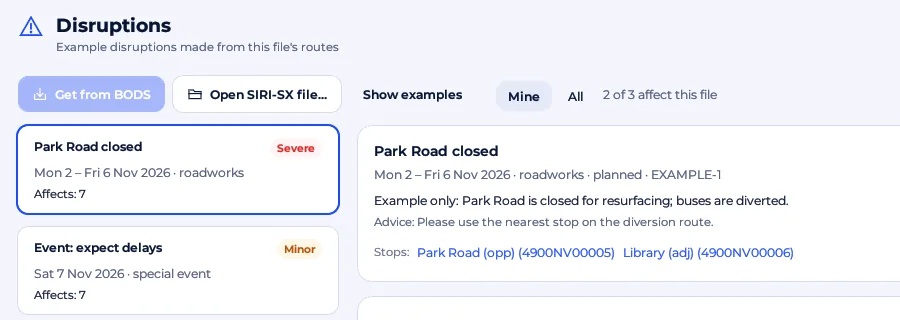
Fare triangles and tickets with NeTEx export. Turn a road closure into a diversion and stop notices.
Collaborate and sign off
Work on a project together live, end-to-end encrypted, with roles, an activity log, change history and approval before export.
Bus registrations
The Traffic Commissioners' local bus registrations, matched to your services, with history, funding and registration checks.
Know it will pass before you send it.
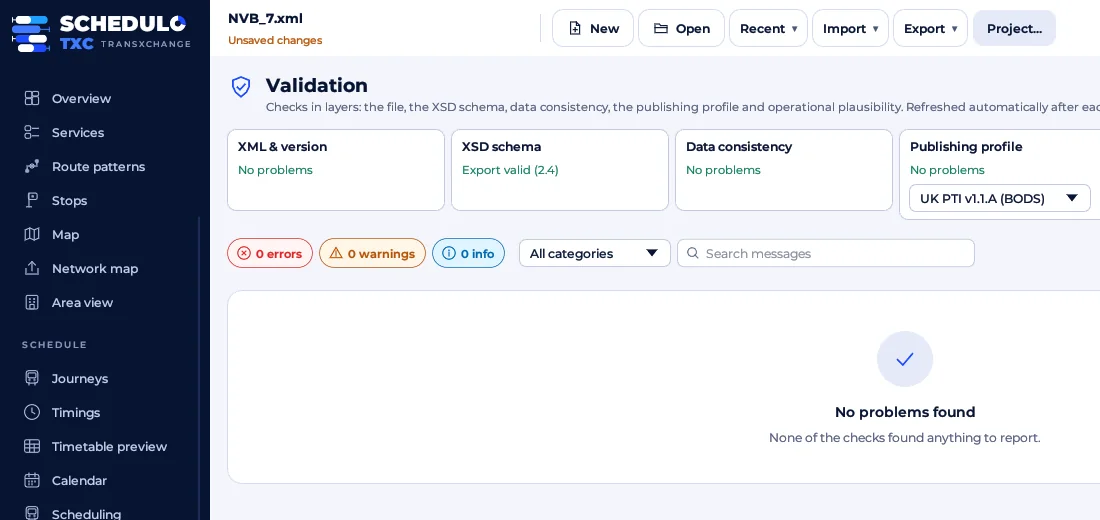
Every problem is explained in plain English and links straight to the object concerned.
- XML and schema version: structural checks, and full XSD validation built in.
- Data consistency: references, timings, calendars and stops.
- UK PTI profile: the rules the Bus Open Data Service checks, each citing its section.
- Operational sense: expired periods, journeys that never run, duplicated trips and implausible speeds.
Your timetable, exactly as you made it.
- Missing running times stay missing and are reported. They are only estimated when you ask.
- Anything the app doesn't edit is written back unchanged, and a fidelity check compares the export with the original.
- Built-in NaPTAN stop database, downloaded by area and kept on your PC.
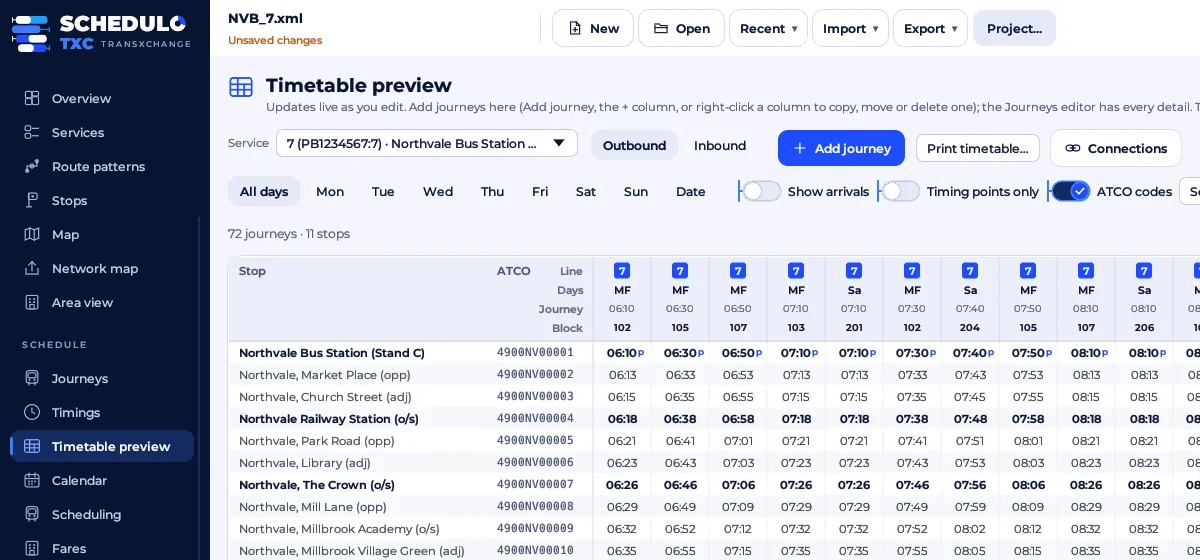
- Timetable preview that works out passing times exactly as the file defines them, and that you can edit directly.
The details that save an afternoon.
Browser version
Schedulo-TXC.html is the same app in one file. It runs from a double-click on computers where you can't install software, and can host or join a shared session.
Journey codes
Number trips by start time, odd and even by direction, sequentially or with your own pattern, for each day type.
Service insights
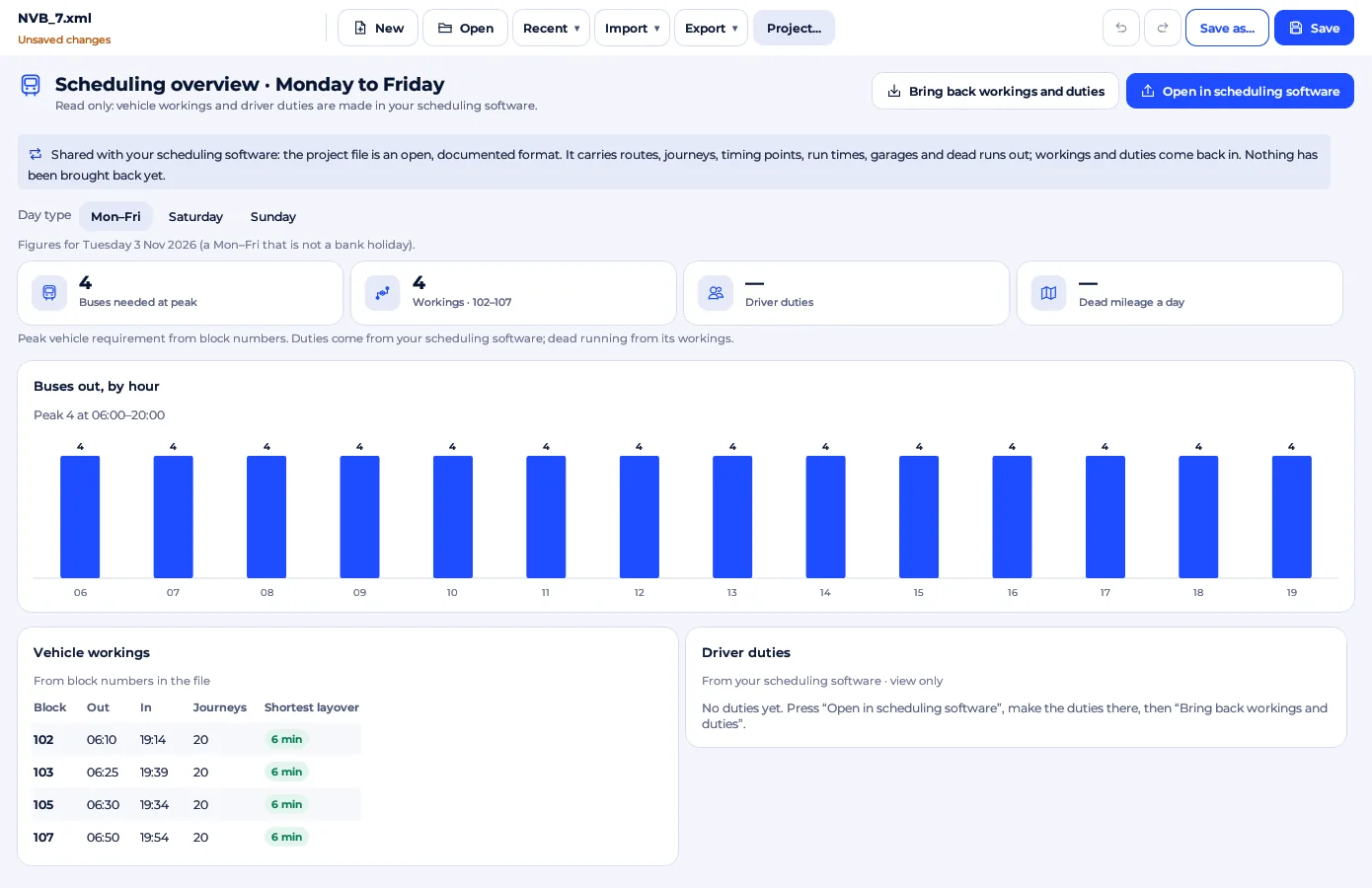
Trips, headways, span, vehicle hours, service miles, peak vehicle requirement, layovers and running times for a day.
Compare files
See how files relate: identical, superseded, consecutive or conflicting services, and stops or operators defined differently.
Import from BODS
Look up an operator's published datasets and add their services to your project.
Export anything
TransXChange 2.4 or 2.5, GTFS, NeTEx fares, and CSV of the timetable, journeys, stops, services or validation issues.
Ticket machine codes
One card on the Services tab sets the ETM service code and each journey's journey code, ETM service code and direction, with buttons to fill them all in.
Blocks and duties on export
Bring back the workings and duties from Schedulo Bus, or tick two boxes on Export, Export for Ticketer or Publish to BODS and the block numbers and duties go straight into the file.
The Schedulo look
A navy rail with the pages grouped Plan, Schedule, Check and Share, folding to icons on small screens. Export TXC, Export for Ticketer and the CSV exports sit together under Export.
Big networks stay quick
Open a hundred files at once in seconds: the window stays usable while they load, the map pans smoothly and Mileage analysis, Service insights and Scheduling open straight away.
BODS-ready ids and links
Every export gives each timing link its route link and run time, writes line ids in the form BODS asks for, and numbers stops so short workings sit in the right rows.
Trip numbers everywhere
Trips are known by their journey code (trip number) in GTFS, the journeys CSV, timetable headers, Insights and every check.
Every part of the timetable, one click away.
Services, route patterns, journeys and days of operation each have their own page, and every change can be undone.
- Route patterns: add, remove and reorder stops, reverse a pattern to start the way back, or copy it under a new name.
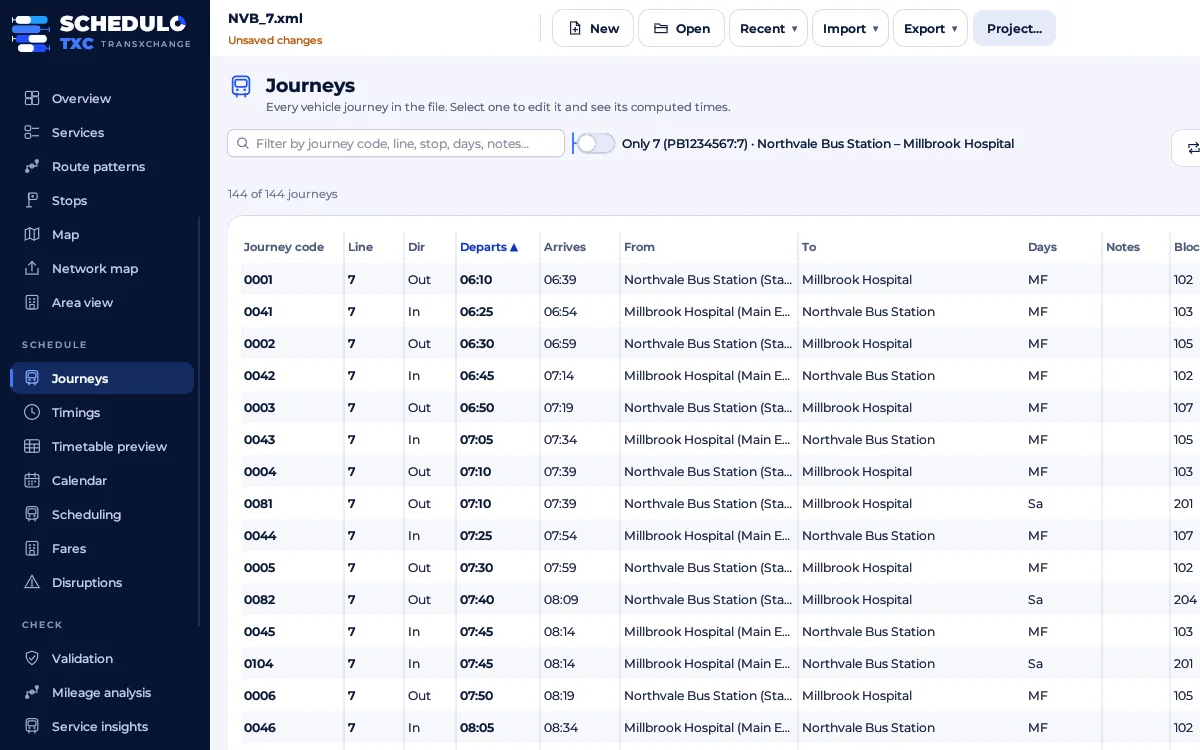
- Journeys: departure, days, codes, block and vehicle type. Duplicate one or repeat it every few minutes to build a clock-face timetable.
- Bulk edit: shift times, retime a section, change days or find and replace across many journeys, with a preview before anything changes.
- Type into the timetable: tick Edit times and type
0745or+2. Times that would run backwards are refused, with a reason. - After midnight: type trip times up to 36:00 (25:30 is 01:30 the next morning), or move many journeys onto the night before in one bulk edit.
- Spreadsheet import: paste a timetable from Excel, check the stops, and Schedulo TXC makes the services, patterns and journeys.
- Full undo and redo, and a history of every change: who made it, when, and each old and new value.
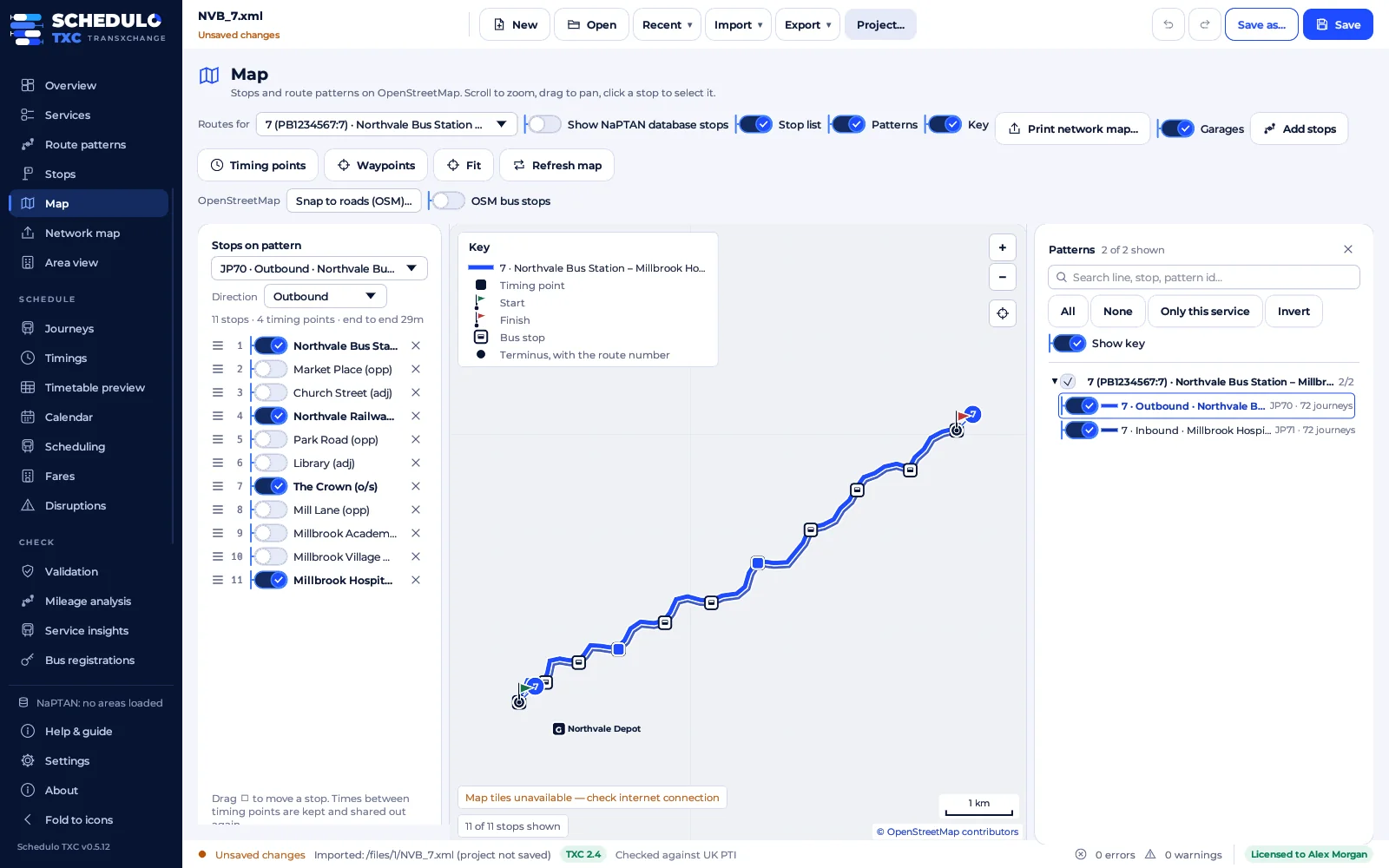
Routes on real roads, stops you can trust.
Every route pattern sits on an OpenStreetMap street map, next to a local copy of NaPTAN for your area.
- Snap to roads: each link follows the roads buses can use, and the road distance feeds the run-time estimates.
- Waypoints: where a route takes the wrong road, click where it should go and it is routed that way.
- Add stops from the map: click a stop to put it on the route in the best place; the times between timing points are shared out by distance.
- NaPTAN by area: download by administrative area or ATCO code, or import a CSV offline. A change watch shows stops that moved, were renamed or closed.
- OSM bus stops: stops mapped in OpenStreetMap compared with NaPTAN and your file, with the differences listed.
- Network maps of your services in 12 styles, including a 45° schematic, as PDF or PNG.
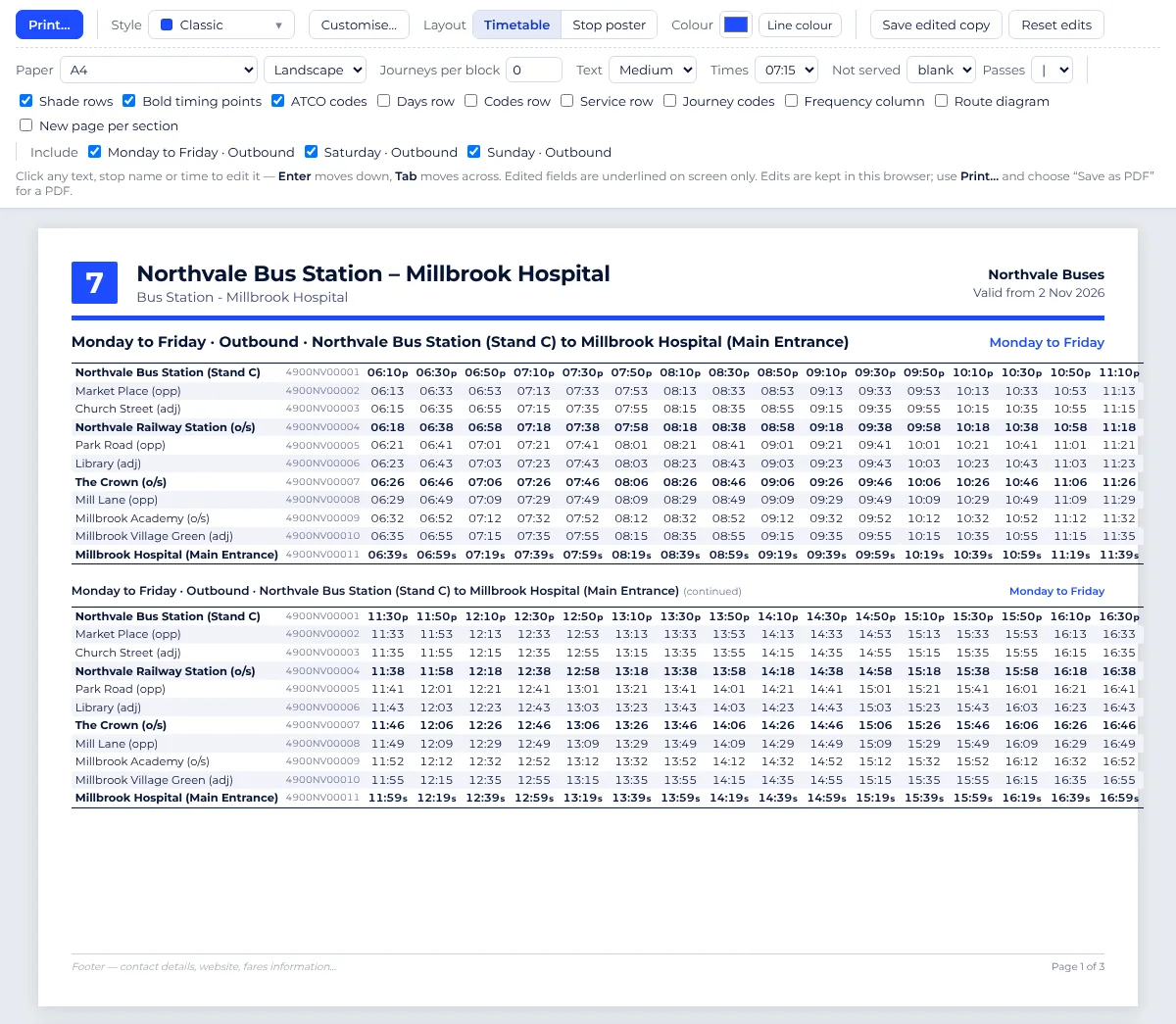
Timetables people can actually read.
Print straight from the timetable, in your browser, ready to print or save as PDF.
- 22 styles, including Classic, Modern, Poster, Minimal, Heritage, Route line and Ink saver, plus your own templates.
- Layouts: a full timetable, a timetable book, or bus-stop posters for one stop or every stop on the route.
- Edit before you print: click any title, stop, time or note and type. Your edits never change the TransXChange file.
- A4, A3 or Letter, either way round, with your choice of time style, text size and bold timing points.
- Welsh and accessible: Welsh and English side by side, and large-print layouts.
- “What's changing” notices for passengers and a summary for councils, Traveline and BODS, made from the old and new timetables.
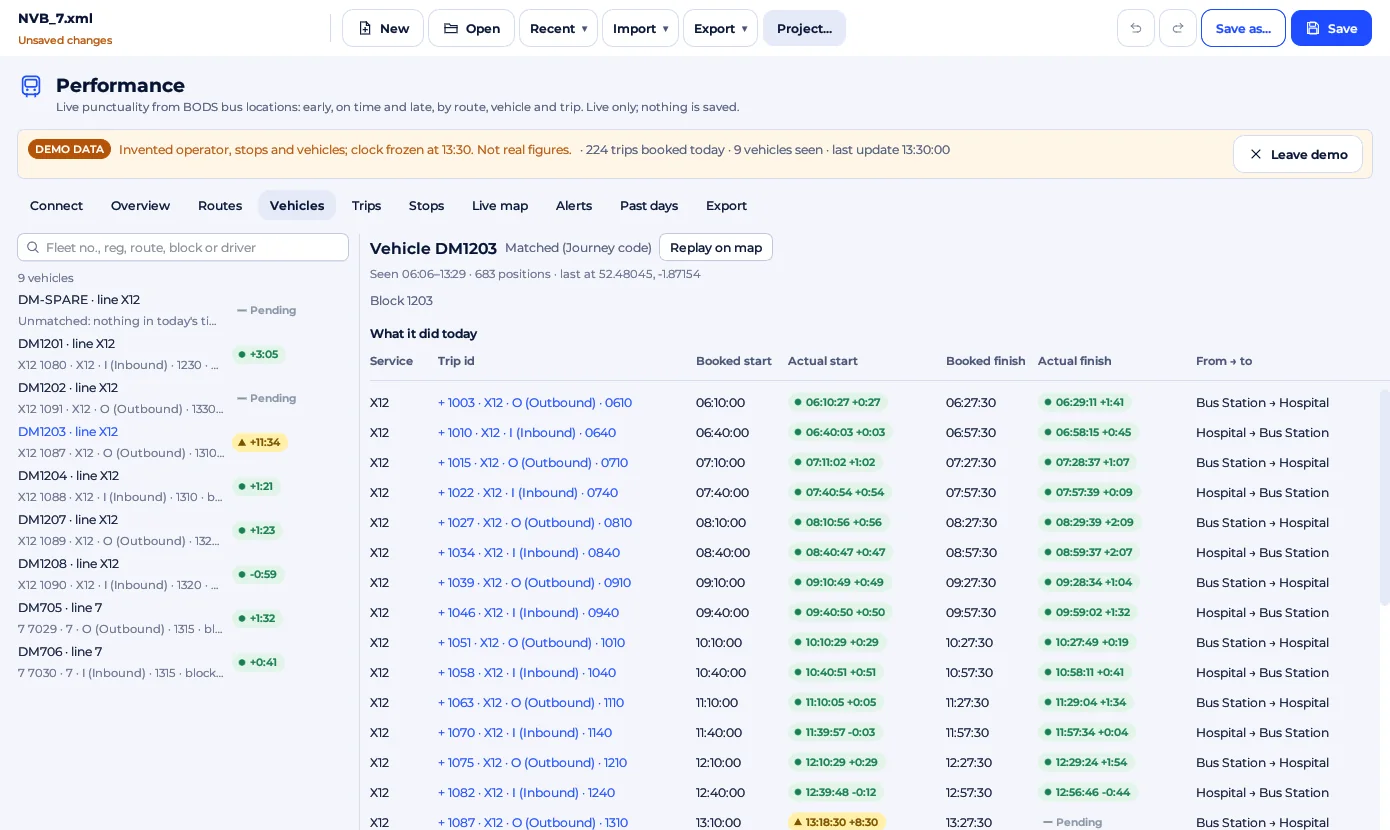
See how the timetable really runs.
Live punctuality from the Bus Open Data Service (with your free API key) or bustimes.org, measured against the timetable you registered.
- Early, on time and late at the start, every principal timing point and the final stop. Every colour also has a shape and a word.
- Screens for every question: overview by time of day, routes, vehicles with a replay of their track, trips, stops and a live map.
- Alerts for early running, late running, bunching and buses that never turned up.
- Frequent services are checked for gaps as well as punctuality.
- Past days: any day up to 31 days back from bustimes.org, for one or more routes or vehicles.
- Export trips and timing points as CSV, or print a report. Demo data lets you try every screen without a key.
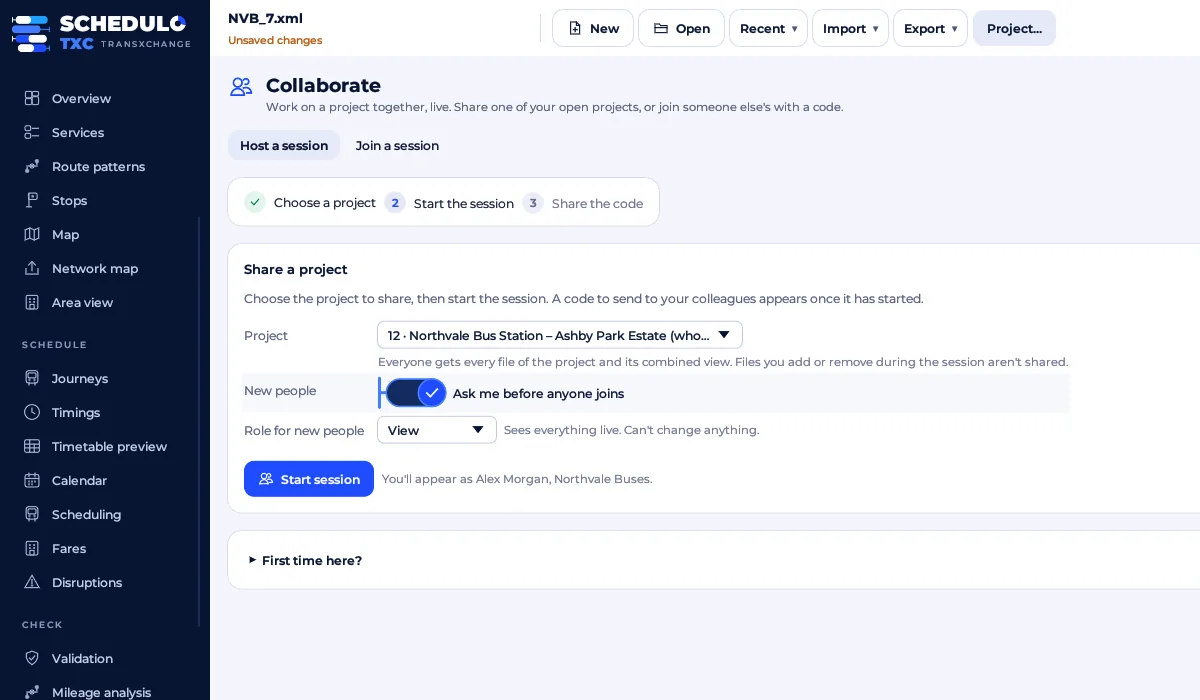
One project, several planners, live.
Host a session and colleagues join with an invite code, from the Windows app or the browser version.
- A waiting room: you let each person in as View, Edit or Full, and can change their role, block them or lock the session.
- Names you can trust: each person's name and company come from their licence key, checked by the host.
- Changes merge item by item (a journey, a stop, a pattern), and everyone sees them as they are made.
- An activity log of who changed what, and sign-off: export can wait until the latest revision is approved.
- End-to-end encrypted and peer to peer, direct where possible, through a relay otherwise, or over the office network without internet.
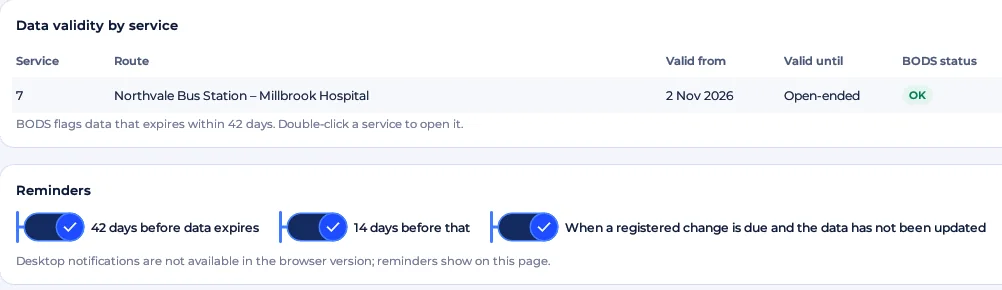
Publish on time, every time.
Schedulo TXC keeps an eye on every service's dates, so data is replaced before BODS flags it.
- Expiry reminders: each service against the BODS 42-day window, with a 14-day warning before it opens.
- Registered changes due: from the file's registration details, with the earliest date a variation can take effect.
- Bus registrations: the Traffic Commissioners' local bus registrations, matched to your services, with their history and funding.
- Christmas and bank holidays: choose Normal, Saturday, Sunday or no service for each festive day, and the wizard writes it.
- School term dates imported from a council's CSV, spreadsheet, calendar or web page.
- Publish to BODS checks each file as it will be uploaded (route links, run times, line ids and stop numbers), so it passes there too.
- Import from BODS, and GTFS in and out.
Blocks, duties and ticket machines.
Beside the public timetable, Schedulo TXC keeps what depots and ticket machines need, and works hand in hand with Schedulo Bus.
- Ticket machine (ETM) codes: the service code and, for every journey, its journey code, ETM service code and direction.
- Operational detail: block number, garage, vehicle type, dead runs before and after a journey, and fare stages.
- Scheduling overview: buses needed at peak, buses out by hour, each block's first and last trip and its shortest layover.
- Bring back workings and duties from Schedulo Bus: each journey gets its block number and duty, and each working its runs to and from the garage, shown before anything changes.
- Blocks and duties on export: tick boxes on Export, Export for Ticketer and Publish to BODS write the block numbers and duties straight from the project, without a bring-back first.
- Export for Ticketer: one file for each day type the journeys run, bank holiday variations included, so Ticketer imports the duties and running boards too.
- Only real timing points are marked as timing points, so ticket machines and bustimes.org show them correctly.
- Trips are known by their journey code (trip number) in GTFS, CSV, the timetable and every check.
Fares, diversions and connections.
The everyday jobs around a timetable, in the same app.
- Fare triangles between fare stages, and tickets: single, return, day, week and 4-week, for adults, children, students and more.
- NeTEx export of a service's fares in the UK fares format, and a fare chart to print.
- Disruptions from BODS or a SIRI-SX file: plan the way round a closure on the map, then create the diversion in one step.
- Stop notices and a driver sheet for each diversion, with a map and turn-by-turn directions.
- Connections checker: how your service connects with other buses and trains at each stop, with suggested retimes.
In practice
What you need to use Schedulo TXC.
The practical marks
- Windows 10 or 11, 64-bit
- One portable .exe: unzip and run, no installer
- Or one HTML file that opens in a browser
- No server and no account to create
- Works offline; the internet only for maps, NaPTAN, BODS and sharing
- Full undo and redo, and a change history
- A licence key on first start, checked offline
- Opens TransXChange 2.4 and 2.5 as they are
- Light and dark mode
Up and running
- Unzip and runRun Schedulo-TXC.exe. The first time, Windows may ask you to confirm: choose More info, then Run anyway.
- Add your keyPaste the licence key we send you. No key yet? E-mail Licence@schedulo.uk.
- Open your timetablesOpen a TransXChange file or start a project, and download the NaPTAN stops for your area.
- Check and publishFix anything Validation explains, then export for BODS.
New features for Schedulo TXC.
Just released in Schedulo TXC 0.5.13, with more on the way:
- Publish to BODS raises the revision number on every upload, so BODS always takes an update.
- Zoom the whole app with Ctrl, from 50% to 300%, kept for next time.
- Bulk edit across services: tick the services and days to change in one go.
- Several days at once in the timetable preview and on printed timetables.
In the next release, announced on our News page.
A look inside Schedulo TXC.
Pick a screen. Real screenshots of the app, with made-up example data.
Runs almost anywhere.
- Windows 10 or 11 (64-bit). One portable app, no installer.
- Or the browser version: one HTML file that opens with a double-click.
- A Schedulo TXC licence key (Licence@schedulo.uk).
- Internet only for NaPTAN and BODS downloads, maps, live punctuality and sharing beyond the office.
Read more.
Ready to plan smarter?
Ask for a demonstration, a trial or a licence key, or tell us what your operation needs. Every message goes to the right person at Newey Transport Services, and we reply by e-mail.
- Demonstrations and general questions
- ContactUs@schedulo.uk
- Licence keys and renewals
- Licence@schedulo.uk
- Help with Schedulo TXC, Bus, Coach or licensing
- Support@schedulo.uk
- News and updates
- Follow Schedulo on LinkedIn